With Microsoft Office "Wave 15" and SharePoint 2013 right around the corner, Microsoft has started to post several videos and slides around the upcoming product. Below is a link to the IT Pro track on Technet, from a high level overview to Architecture and Upgrade modules.
Tuesday, July 17, 2012
SharePoint 2013 Presentations
With Microsoft Office "Wave 15" and SharePoint 2013 right around the corner, Microsoft has started to post several videos and slides around the upcoming product. Below is a link to the IT Pro track on Technet, from a high level overview to Architecture and Upgrade modules.


"Value does not fall within the expected range." When activating Microsoft Publishing after 2010 upgrade
We recently did an upgrade from MOSS 2007 to SharePoint Server 2010, and one of the site collections wouldnt allow Publishing to be activated. It either threw a Columns error or the "Value does not fall within the expected range." error when attempting to access. Via STSADM or PowerShell, it would error out as well, including removing completely and attempting to re-install. (note
this problem Site Collection is a legacy WSS 2.0 site collection that had been upgraded to WSS 3.0, MOSS and now to SP2010 which is bad, but we never had the ability to force new sites to be created)
In doing a side by side comparison between the problem Site Collection and one that worked using the Get-SPFeature -url http://SharePointsite, it showed that the Publishing service is actually composed of 3 seperate features.
1)PublishingSite
2)PublishingLayouts
3)PublishingResources
I enabled them in the above order by running:
Enable-SPFeature -Identity PublishingSite -url Http:://SharePointsite
Enable-SPFeature -Identity PublishingLayouts -url Http:://SharePointsite
Enable-SPFeature -Identity PublishingResources -url Http:://SharePointsite
And that did the trick.
this problem Site Collection is a legacy WSS 2.0 site collection that had been upgraded to WSS 3.0, MOSS and now to SP2010 which is bad, but we never had the ability to force new sites to be created)
In doing a side by side comparison between the problem Site Collection and one that worked using the Get-SPFeature -url http://SharePointsite, it showed that the Publishing service is actually composed of 3 seperate features.
1)PublishingSite
2)PublishingLayouts
3)PublishingResources
I enabled them in the above order by running:
Enable-SPFeature -Identity PublishingSite -url Http:://SharePointsite
Enable-SPFeature -Identity PublishingLayouts -url Http:://SharePointsite
Enable-SPFeature -Identity PublishingResources -url Http:://SharePointsite
And that did the trick.
Wednesday, September 29, 2010
SharePoint 2010 Licensing Calculator
As part of my engagements, invariably the discussion turns towards what version of SharePoint 2010 server the customer should purchase, STD vs Enterprise, Intranet vs Internet, etc etc. And more importantly, how much it costs.
Most of the time the answer is "It Depends", its widely accepted that Microsoft is notoriously vague as to the real cost of SharePoint. Say you have a 1000 users and you want to go to Enterprise on a 3 server farm (WFE/Index/SQL Servers). So by going through the guidlelines for generic SharePoint 2010 Costs....How does 4896 per SharePoint Server (WFE and Index) for a total of $9792 grab you? But wait there's more, you also have to pay $94 dollars per CAL for your 1000 users for Standard, $94,000 there, and $83 dollars per CAL for Enterprise for another $83000 on top of that...
But all hope is not lost, Microsoft has a fairly robust online licensing calculator that can give you your true cost, taking into account your licensing agreement with Mother Microsoft, which will Dramatically affect those numbers above. The link is here , just select the software needs and enter in the pertinent data, and you can move back from the ledge or be able to make a better case for a different level of licensing, as the end report shows how much each form of agreement costs. Good luck.
Most of the time the answer is "It Depends", its widely accepted that Microsoft is notoriously vague as to the real cost of SharePoint. Say you have a 1000 users and you want to go to Enterprise on a 3 server farm (WFE/Index/SQL Servers). So by going through the guidlelines for generic SharePoint 2010 Costs....How does 4896 per SharePoint Server (WFE and Index) for a total of $9792 grab you? But wait there's more, you also have to pay $94 dollars per CAL for your 1000 users for Standard, $94,000 there, and $83 dollars per CAL for Enterprise for another $83000 on top of that...
But all hope is not lost, Microsoft has a fairly robust online licensing calculator that can give you your true cost, taking into account your licensing agreement with Mother Microsoft, which will Dramatically affect those numbers above. The link is here , just select the software needs and enter in the pertinent data, and you can move back from the ledge or be able to make a better case for a different level of licensing, as the end report shows how much each form of agreement costs. Good luck.
Thursday, March 25, 2010
Adding a choice list for User Profile Information within MySites
This issue has come up a couple times recently as a few clients have started to use their MySites more frequently. In one case, they wanted to give users a list of Projects that they were assigned to that users could add themselves. Rather than have the users manually type in the information, leading to typo's and misspellings, I created a custom lookup list within a new Profile Property.
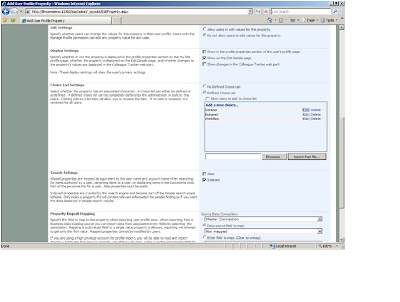
From within the "user profiles and properties" under the Shared Services and Administration home page, click "Add Profile Property".
From the new property screen, enter in the info for name, display name, property type, and then click the check box for "Allow Choice List".
 Then further down the page under "Choice List Settings" , select "Defined choice list" and at the bottom you can browse to and upload a file (has to be a CSV file), then you will have your choices listed.
and now the users will be able to pick from them when editing this property on their "MySites" page:

This new property is indexable and searchable, thus providing greater information about your users.
From within the "user profiles and properties" under the Shared Services and Administration home page, click "Add Profile Property".
From the new property screen, enter in the info for name, display name, property type, and then click the check box for "Allow Choice List".


and now the users will be able to pick from them when editing this property on their "MySites" page:

This new property is indexable and searchable, thus providing greater information about your users.
Subscribe to:
Posts (Atom)